Regex Tester & Debugger
Real-Time Pattern Matching
Test, debug, and understand regular expressions with real-time matching, pattern explanation, and common regex library. 100% client-side. Zero data stored.
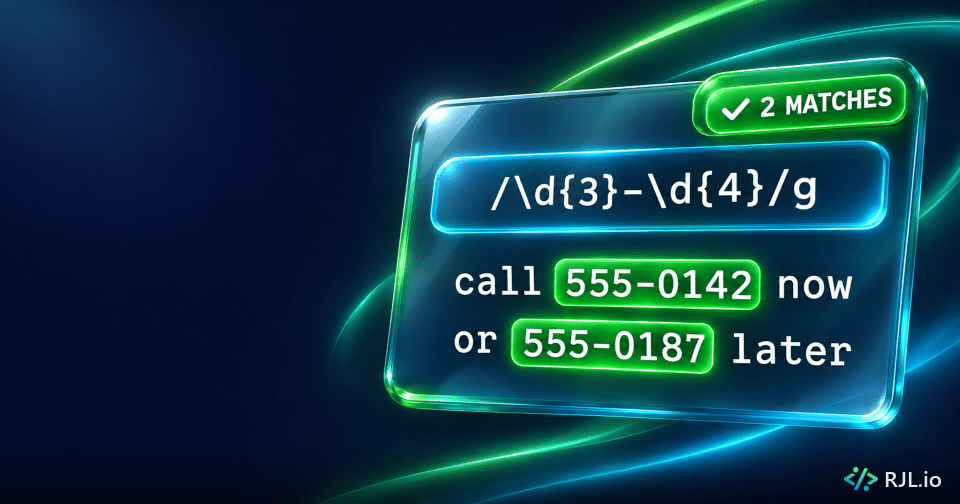
Regex Tester Tool
Regular Expression
Test String
Matches 0
Matched text is highlighted in green. The count shows total matches found.
Replace
Replace matched text with your string. Use $1, $2 to reference captured groups from your pattern.
Match Details
Shows each match with its position and captured groups. Groups are parts of the pattern in (parentheses).
Pattern Explanation
Every token of your pattern in plain English, nested the way the pattern is. If the pattern is malformed, you see what was understood and where it stopped.
Regex Cheat Sheet
Click an entry to insert it into your pattern at the cursor. Entries with brackets put the cursor between them so you can keep typing.
JavaScript Flavor Notes
This tool runs the JavaScript regex engine, and the explanation covers JavaScript syntax only. If you are coming from PCRE (PHP, grep -P) or Python, these are the differences that bite most often.
- No possessive quantifiers or atomic groups.
a++and(?>a+)are errors. A lookahead with a backreference can imitate an atomic group. - No recursion, conditionals or verbs.
(?R),(?(1)a|b)and(*SKIP)do not exist. - Named groups:
(?<name>...)and\k<name>. Python writes(?P<name>...)and(?P=name). - No
\A,\Z,\z,\h,\R,\Kor\G. Use^and$without the m flag for the start and end of the text. $matches only at the very end of the text. In PCRE and Python it also matches just before a final newline.- Flags are not written inside the pattern. There is no leading
(?i); set the flag next to the pattern. Newer browsers accept a scoped form such as(?i:abc). \d,\wand\bare ASCII only, even with the u flag. Python 3 matches Unicode digits and letters by default. In JavaScript use\p{Nd}or\p{L}with the u flag..skips line breaks (\n,\rand two Unicode separators). Turn on the s flag to include them.- Lookbehind can be any length in JavaScript, which PCRE and Python do not allow.
- Replacement syntax:
$1,$<name>and$&. Python uses\1and\g<name>. - Unicode property escapes need the u (or v) flag: without it,
\p{L}just matches the plain text "p{L}".
Common Patterns
Quick Reference
. Any char \d Digit \w Word char \s Whitespace ^ Start $ End * 0 or more + 1 or more ? Optional {n,m} n to m [abc] Char class () Group | Alternation \b Word boundary Privacy First
All regex testing happens locally in your browser. Your patterns and test data never leave your device.
Common Use Cases
Email Validation
Test and debug email validation patterns for forms and user input validation across different email formats.
Code Parsing
Extract function names, class definitions, or specific code patterns from source files during development.
Text Processing
Find and replace patterns in logs, documents, or data files with capture groups and complex replacements.
URL Extraction
Extract URLs, domains, or query parameters from web content for scraping and data collection projects.
Log Analysis
Parse server logs, error messages, and debugging output to extract timestamps, error codes, and patterns.
Input Sanitization
Validate and sanitize user input by testing patterns for phone numbers, credit cards, and sensitive data.
JavaScript Regex Reference
This tester uses the JavaScript regular expression engine, so everything here applies to RegExp in the browser and in Node.js. Other languages (Python, PCRE, .NET) share most of the syntax but differ in the details.
Anatomy of a regular expression
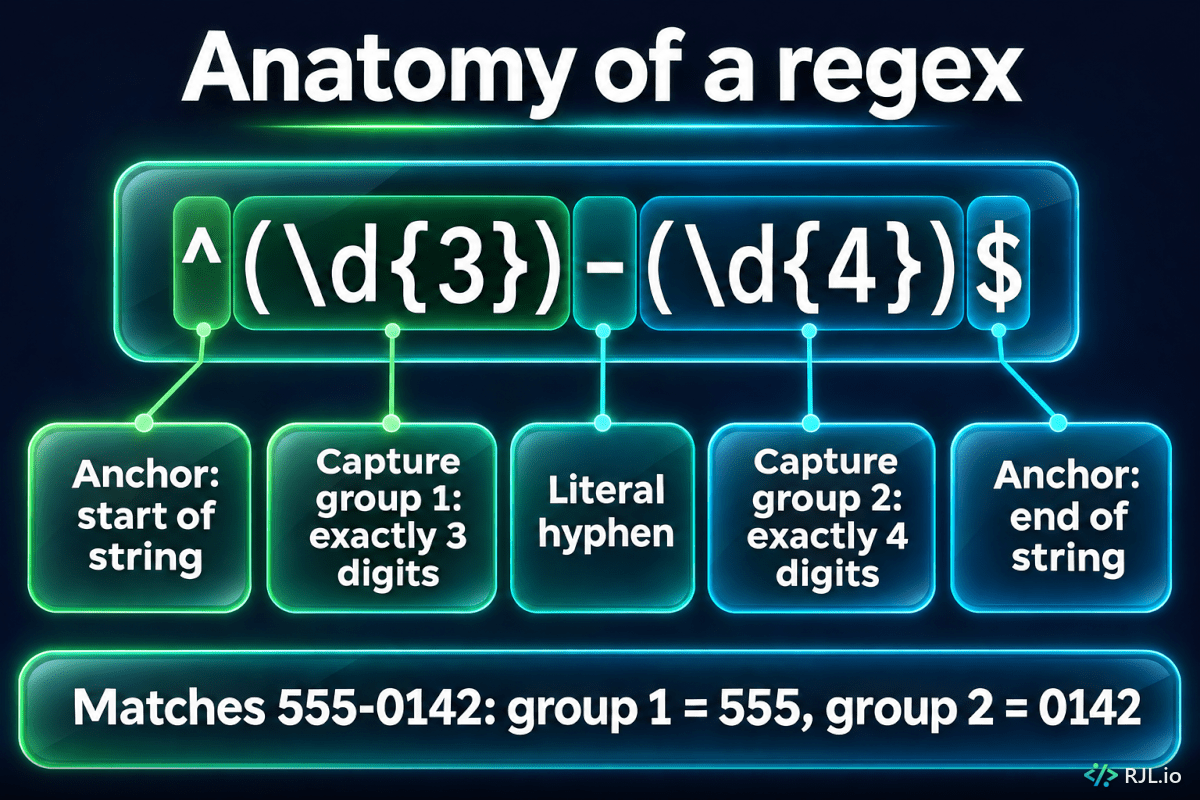
A regex is a sequence of small parts. Literals match themselves, classes like \d match a kind of character, quantifiers say how many times, anchors pin a position, and groups capture a piece of the match.
In ^(\d{3})-(\d{4})$ the anchors force the whole string to fit, and the two groups capture the 3-digit and 4-digit parts. Run it against 555-0142 in the tester and open the match details to see group 1 and group 2.
Groups are numbered by the position of their opening parenthesis, left to right. Use (?:...) when you need grouping but not a capture.
Syntax tables
Character classes and anchors
| Token | Matches |
|---|---|
. | Any character except a line break (with the s flag, line breaks too) |
\d \D | A digit [0-9] / anything that is not a digit |
\w \W | A word character [A-Za-z0-9_] / anything else |
\s \S | Whitespace (space, tab, line break) / anything else |
[abc] | One of the characters a, b or c |
[^abc] | Any character except a, b or c |
[a-z0-9] | One character from a range |
\p{L} | Any Unicode letter (needs the u flag) |
^ $ | Start / end of the string (of each line with the m flag) |
\b \B | A word boundary / a position that is not a word boundary |
\. \* \\ | A literal dot, star or backslash: escape special characters with \ |
Quantifiers
| Token | Matches |
|---|---|
a* | Zero or more a (greedy) |
a+ | One or more a (greedy) |
a? | Zero or one a |
a{3} | Exactly 3 a |
a{3,} | 3 or more a |
a{3,5} | Between 3 and 5 a |
a*? a+? a?? a{3,5}? | Lazy versions: match as little as possible |
Groups, alternation and lookarounds
| Token | Meaning |
|---|---|
(abc) | Capture group, numbered from 1 by its opening parenthesis |
(?:abc) | Non-capturing group |
(?<year>\d{4}) | Named capture group |
\1 \k<year> | Backreference to group 1 / to the group named year |
a|b | Alternation: a or b |
(?=x) (?!x) | Lookahead: followed by x / not followed by x |
(?<=x) (?<!x) | Lookbehind: preceded by x / not preceded by x |
Lookbehind needs a reasonably recent browser (Safari added it in version 16.4).
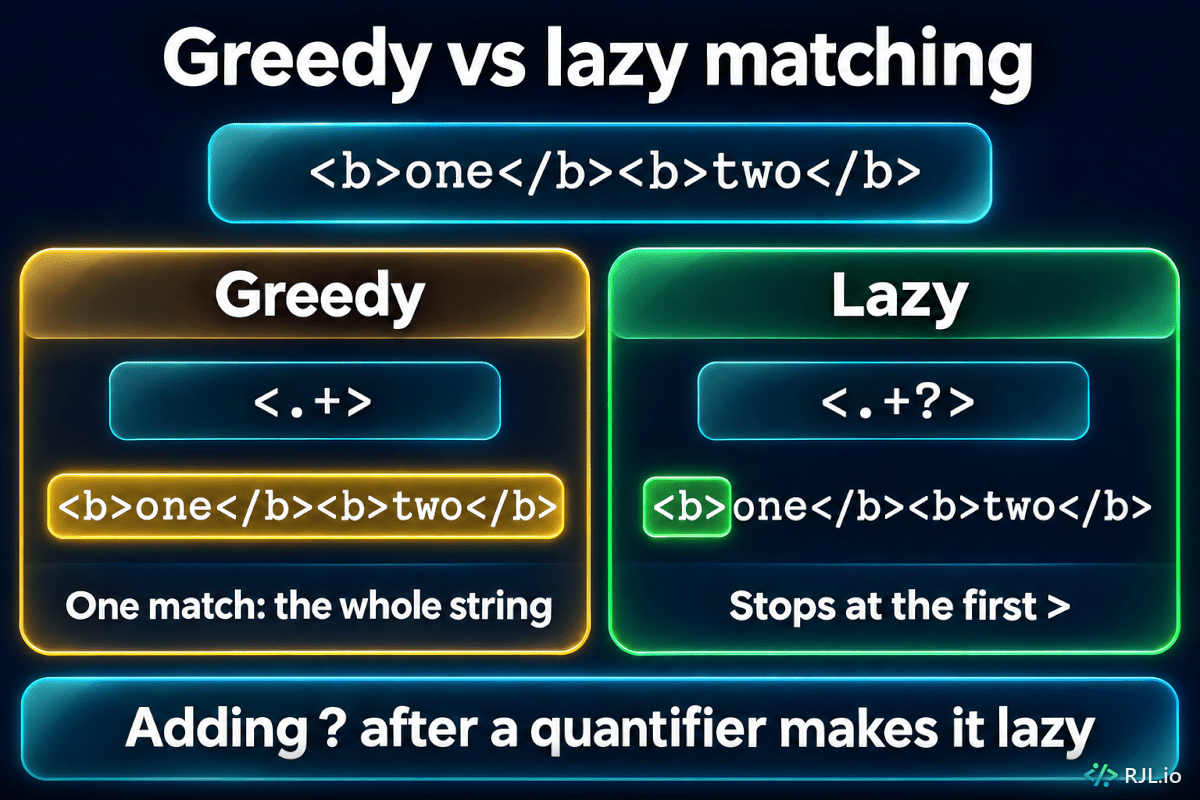
? turns a greedy quantifier into a lazy one.Greedy vs lazy matching
Quantifiers are greedy by default: they grab as much text as they can, then give back characters until the rest of the pattern fits. Against <b>one</b><b>two</b>, the pattern <.+> returns the entire string as a single match.
Add ? after the quantifier to make it lazy. <.+?> stops at the first > it can, so with the g flag it returns <b>, </b>, <b> and </b> as four separate matches.
A negated class is often clearer and faster than a lazy dot: <[^>]+> matches the same tags without any backtracking.
Flags
Flags change how the whole pattern behaves. They are the checkboxes under the pattern field in the tester above.
| Flag | Effect |
|---|---|
g | Global: find every match, not just the first |
i | Ignore case |
m | Multiline: ^ and $ match at each line |
s | Dot-all: . also matches line breaks |
u | Unicode: full code point support and \p{...} classes |
Replacement tokens
In the replace box, these tokens insert parts of the match. For example, find (\w+)@(\w+)\.com and replace with $2: $1 to swap the two parts.
| Token | Inserts |
|---|---|
$1 $2 | The text matched by capture group 1, 2, and so on |
$<name> | The text matched by a named group |
$& | The whole match |
$$ | A literal dollar sign |
Common regex mistakes and how to fix them
| Mistake | What happens | Fix |
|---|---|---|
An unescaped dot, as in example.com | The dot matches any character, so exampleXcom also matches | Escape it: example\.com |
| No anchors when validating input | \d{3} matches inside a1234b | Anchor it: ^\d{3}$ |
Greedy dot between quotes: "(.*)" | Matches from the first quote to the last quote on the line | Use "([^"]*)" or "(.*?)" |
Expecting . to match a line break | Matching stops at the end of each line | Turn on the s flag, or use [\s\S] |
Nested quantifiers such as (a+)+$ | Catastrophic backtracking: a failing match on a long input can freeze the page | Remove the nesting, for example a+$, and keep alternatives from overlapping |
Reusing one g regex with .test() in code | The regex remembers lastIndex, so repeated calls can alternate between true and false | Drop the g flag for yes/no checks, or reset lastIndex to 0 |
| Using a regex to fully validate an email address | Accepts addresses that do not exist and can reject valid ones | Use a loose check such as ^\S+@\S+\.\S+$, then confirm by sending a message |
Cleaning up the text you matched? Compare before and after with the Diff Checker, or encode captured query values with the URL Encoder.
Frequently Asked Questions
Why We Built Regex Tester
Regular expressions are incredibly powerful but notoriously difficult to write and debug. A single misplaced character can break your entire pattern, and understanding why it doesn't match can be frustrating. Developers need a fast, reliable way to test regex patterns without context switching between editors and online tools.
Unlike online tools that send your data to external servers, Regex Tester processes everything locally using JavaScript. This means your sensitive data, test strings, and patterns never leave your computer. The tool works completely offline once loaded, making it safe for enterprise environments and air-gapped systems. Test regex on production logs, customer data, or API responses without privacy concerns.
Regex Tester is part of RJL.io's collection of free developer tools - each designed to do one thing exceptionally well, with no accounts, no tracking, and no data collection. Check out our other tools: UUID Generator, QR Code Generator, Base64 Encoder, and more. Every tool is 100% client-side, works offline, and respects your privacy.